
VidPlayer - Video & Audio Play2.1.4.10 - Get APK
Please wait ... Your download link is being verified for malicious content.
You'll be able to download in few seconds.
You'll be able to download in few seconds.
Publisher Description


VidPlayer
is the one and only professional HD video player. VidPlayer supports all format audio and video fast and free of cost with high resolution and quality remaining. It supports video status, movies, trailers watching and music playing. VidPlayer can also be a stable and powerful streaming live video player.
____________________________________________________________
VidPlayer
contains all advanced features:
* All types of video formats support, including MKV, MP4, M4V, AVI, and more other formats
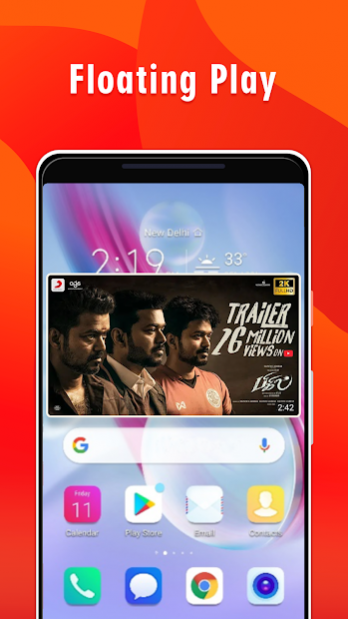
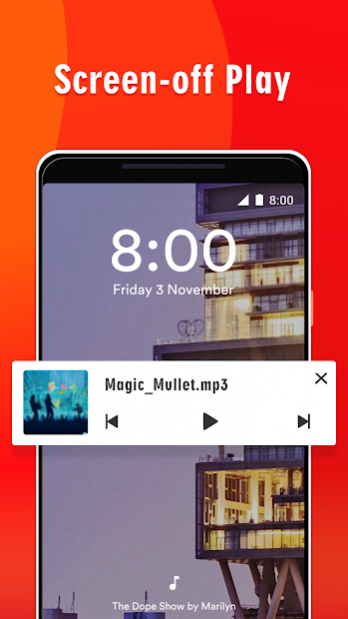
*Support auto-floating play, background play, screen-off play
*Video player: play status videos, trailers, movies, high-resolution HD, QHD, 4K, Ultra HD videos
*Music player: play music/song playlist, high-quality remaining
*Mp4 to Mp3 convert, Video to Audio convert
*Network stream play: enter video url and watch scream live
*gesture operation to easy control playback speed (0.25x – 2x) light & volume
*video playback continuous from the last position smartly
*low power consuming, battery saving
*Pause playback when the headset is unplugged as the awesome music player.
♥
Auto Floating Play/PiP Mode
- Continue playing videos even when you switch to another app! PiP Mode allows you to multitask by adjusting the size and position of VDM player’s floating window. In this way, by installing the best video player, you are free to do other things while watching videos or listening to songs.
Easy and Convenient Control
- Gesture control playback, adjust speed, brightness and volume with swipe screen option. Easily control last video or next video to play. Simply convert to audio or choose floating play by simple one click.
♥
Better Manage Videos on Your phone
VidPlayer is able to identify your media files in your primary & secondary storage after getting your permission for “read_external_storage”, which allows you to sort out and play all the videos on your mobile phone quickly. Not only can you locate the videos directly, but you can rename, revise or delete videos in a more convenient way.
_______________________________________________________________________
Try
VidPlayer
, the free, top-rated and lightweight music and video player most powerful video player with advanced features. Enjoy your time with VidPlayer as your best video mate.
Contact us: quantumdeveloperteam@gmail.com
About VidPlayer - Video & Audio Play
VidPlayer - Video & Audio Play is a free app for Android published in the Video Tools list of apps, part of Audio & Multimedia.
The company that develops VidPlayer - Video & Audio Play is Quantum Developer Team. The latest version released by its developer is 2.1.4.10.
To install VidPlayer - Video & Audio Play on your Android device, just click the green Continue To App button above to start the installation process. The app is listed on our website since 2020-08-23 and was downloaded 0 times. We have already checked if the download link is safe, however for your own protection we recommend that you scan the downloaded app with your antivirus. Your antivirus may detect the VidPlayer - Video & Audio Play as malware as malware if the download link to com.quantum.videoplayer is broken.
How to install VidPlayer - Video & Audio Play on your Android device:
- Click on the Continue To App button on our website. This will redirect you to Google Play.
- Once the VidPlayer - Video & Audio Play is shown in the Google Play listing of your Android device, you can start its download and installation. Tap on the Install button located below the search bar and to the right of the app icon.
- A pop-up window with the permissions required by VidPlayer - Video & Audio Play will be shown. Click on Accept to continue the process.
- VidPlayer - Video & Audio Play will be downloaded onto your device, displaying a progress. Once the download completes, the installation will start and you'll get a notification after the installation is finished.
Program Details
System requirements
Operating systems
Android
Download information
File size
N/A
Total downloads
0
Pricing
License model
Free
Price
Version History
Here you can find the changelog of VidPlayer - Video & Audio Play since it was posted on our website on 2020-06-07. The latest version is 2.1.4.10 and it was updated on Apps112 on 10 October, 2026. See below the changes in each version:
version 2.1.4.10
posted on 2020-08-24
Add equalizer feature
Improve stability
Bug fixes
Disclaimer
External Download
We do not host VidPlayer - Video & Audio Play on our servers. We did not scan it for viruses, adware, spyware or other type of malware. This app is hosted by Galad and passed their terms and conditions to be listed there. We recommend caution when installing it.
The APK Download link for VidPlayer - Video & Audio Play is provided to you by apps112.com without any warranties, representations or guarantees of any kind, so access it at your own risk.
If you have questions regarding this particular app contact the publisher directly. For questions about the functionalities of apps112.com contact us.
